
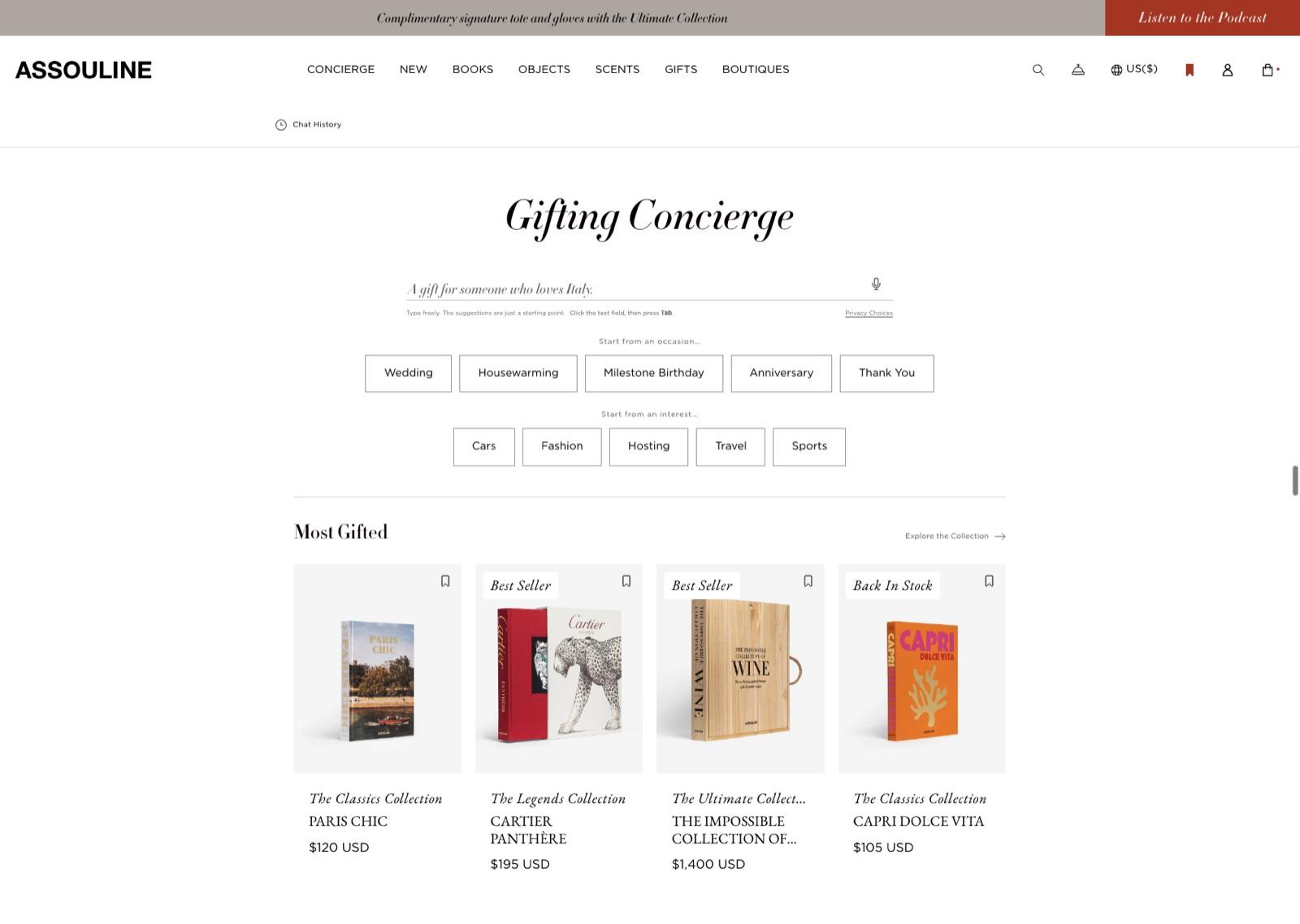
Omi on your store
Omi offers two products. Sales Associate answers product questions and helps shoppers choose on every page of your storefront. Concierge does the same on a dedicated shopping page, starting from an occasion or an idea. Both include the Dashboard for your retail team.
Omi installs as a Shopify app. Your catalog syncs when you connect the store, and the associate appears on your storefront once you turn on the Omi app embed in your theme. There are no theme code changes; the embed is a switch in the Shopify theme editor, set per theme.
Shoppers open the associate from any page. A shopper types or taps a question, and Omi replies in text with product cards from your catalog. Cards link to your product pages, and adding to cart uses your store’s own cart, so pricing, taxes, shipping, and checkout stay exactly as Shopify runs them.
Concierge runs as a page on your site rather than a widget. A shopper describes who they are shopping for or what they are looking for, Concierge builds a shortlist and explains each pick, and the conversation stays in place as they move between product pages.
Setup typically takes less than a week from install to launch, most of it spent reviewing the information Omi has about your store. The Getting started page walks through the stages.
The information Omi uses
Omi uses your catalog, the store information you provide, and the shopper’s question and context to give relevant answers. You shape its expertise and voice through Skills. This is the whole list; nothing else feeds an answer.
- Your catalog
- Products, variants, prices, images, descriptions, tags, collections, and availability, read from Shopify. Size charts are included where your products carry them. Omi indexes the catalog when you connect the store, picks up product changes from Shopify as they happen, and refreshes the whole catalog every day.
- Store information
- What you enter in the Dashboard: store details and hours, shipping and returns policies, frequently asked questions, custom responses to common questions, and how support requests should be routed. Much of this can be pre-filled from your public store pages, and you review everything before launch.
- Skills and voice
- Plain-language instructions about what the associate should know, how it should behave in a given moment, and how it should sound. Skills come from a library you can adapt or you write your own. A brand voice guide can be added for brands that have one.
- The shopper’s context
- The shopper’s message, the page they are on and the product or collection it shows, what is in their cart, the products they have viewed or saved on your store, and preferences they share in the conversation, such as a size or a budget. If they ask about an order, the order number and email they provide. If they are signed in to your store, Shopify passes their customer ID so their preferences follow them across devices. If you enable photo search, a photo they choose to upload.
- What Omi does not use
- Omi does not read your Shopify customer records, payment or checkout details, or anything shoppers do outside your store. Information from one store is never used to answer shoppers on another.
How it answers and recommends
When a shopper asks for something, Omi finds the products in your catalog that fit the request and the shopper’s context, then writes an answer around them. It only recommends products that exist in your catalog and are available to buy. When something is sold out, it says so and offers alternatives that are in stock.
Your merchandising settings shape the shortlist: which products lead, which collections to favor, and which items never appear. The shopper’s context keeps it relevant. On a product page, “what goes with this” is answered around that product; with items in the cart, suggestions complete the order rather than restart it; a size or budget the shopper mentioned earlier carries into later answers.
Questions about your store are answered from the information you provided. When a shopper asks how returns work, Omi answers from your returns policy, and in your exact words where you wrote a custom response. Omi is built to answer store questions only from what you provided, and to say when it does not have the information rather than guess.
When a shopper asks about an order, Omi asks for the order number and the email used on the order, looks the order up in Shopify, and reports its status. Where the carrier is UPS, FedEx, or DHL, it includes the latest tracking update.
When a request needs a person, such as a problem with an order or something outside your policies, Omi collects the details and sends them to the support route you chose. It does not promise outcomes on your behalf.
Omi remembers what a shopper tells it about themselves, such as sizes and preferences, so later conversations start from there. A shopper can ask the associate to forget this at any time, and this learning can be turned off for your store.
Skills and brand voice
A Skill is a set of instructions, written in plain language, that tells the associate how to handle a kind of moment on your store: how to talk a shopper through sizing, how to build a gift shortlist, how to speak about limited editions, how to handle a return question. Skills come from a library of templates you can adapt, or you write your own.
Skills cover three things:
- Voice: how the associate sounds. Short, considered sentences with no hype, or the warmth of a boutique floor.
- Expertise: what it knows and asks before it answers. Asking for an item that already fits before quoting a size, or asking who a gift is for before suggesting one.
- Behavior: what it does in a moment. Suggesting a complement only after the shopper has settled on the main item, or offering an exchange size before a return.
Skills are configuration, not training. The associate reads your enabled Skills on every conversation, so a change applies to the next conversation and can be switched off just as quickly. Omi’s models are not retrained on your Skills, your catalog, or your shoppers’ conversations.
Skills work inside Omi’s own rules. A Skill can change tone, add expertise, and set priorities. It cannot make the associate invent products, quote prices that are not in your catalog, or set aside its honesty rules. Your Omi team sets Skills up with you and can change them at any time.
For brands with a written voice guide, your Omi team can load it so the associate follows the house style in every answer: preferred and avoided words, sentence rhythm, how to talk about price.
In the Dashboard, the stage where you review what the associate knows is called Training. It means teaching the associate about your store. It does not train a model.
What you control
- Appearance and placement
- Light or dark theme, corner style, accent color, logo, and typography. The associate appears on your storefront through the Omi app embed in the Shopify theme editor, so you decide which theme carries it.
- Conversation starters
- The first prompts shoppers see when they open the associate, written in your voice and rotated in sets so the opening does not feel static.
- Touchpoints
- Each moment where the associate steps in on the homepage, collection, product, and cart pages is a switch. Turn off anything that does not suit your store.
- Merchandising
- Which products lead, which collections to favor when they fit a request, and which items should never be recommended, such as gift cards or packaging.
- Store information and Skills
- Everything the associate knows about your store, the custom responses it gives, and the Skills that shape its expertise and voice. Changes reach the next conversation within about a minute.
- Support routing
- Send shopper requests that need a person to Gorgias, to your support email, or to the Tickets inbox in the Dashboard.
- Privacy
- Turn off learning from conversations, decide whether signed-in shoppers can connect their store account, enable or disable photo search, and request deletion of your store’s data at any time.
- Language
- The associate answers in the language you set for your store.
What your team sees
Conversations is the record of every shopper the associate talked to: what they asked, the products it showed, and how the conversation ended. Open any thread to read the full exchange.
Analytics shows Omi-assisted orders and revenue, engagement, and a per-shopper funnel from opened to messaged to saw a product to purchased. Omi-assisted means the shopper engaged with Omi in the seven days before the purchase. It claims assistance, not causation, and the definition sits under the number wherever it appears.
Tickets holds every request the associate handed to support, with the full exchange, so your team can reply from the Dashboard and mark it resolved.
The setup guide walks through every screen of the Dashboard, from connecting the store to what each setting does after launch.
Limitations and what to expect
- Omi is an AI assistant and can make mistakes. It works from your catalog and the information you provide, so gaps there show up in its answers. Review conversations in the first weeks and fill gaps with custom responses or Skills.
- Catalog changes reach Omi within minutes through Shopify product updates, with a full refresh every day. Availability on a card reflects the last sync; your product page and checkout remain the source of truth.
- Omi does not change products, prices, orders, or store settings, and it does not take payment. Checkout is Shopify’s.
- The associate loads after your page content as a deferred script, like other Shopify app embeds. It adds to the page’s total weight and does not block your content from rendering.
- Omi is not a replacement for your support team on orders, refunds, or complaints. It collects the request and hands it to the route you chose.
Support
Questions about Omi or your integration go to accounts@youromi.com. We reply within one business day. For where information is stored, how long it is kept, and which providers are involved, see Security and data.